The binary search algorithm is one of the fastest ways to find an element in a sorted array. Unlike linear/sequential search, the binary search does not compare the element being searched for with all the elements of the array. Fewer comparisons equals to more speed. Every JavaScript developer should have a knowledge about this algorithm. If you are searching for an index or a value in a sorted array, you can use this algorithm instead of JavaScript’s find()/findIndex(). With that said, let’s dive right in.
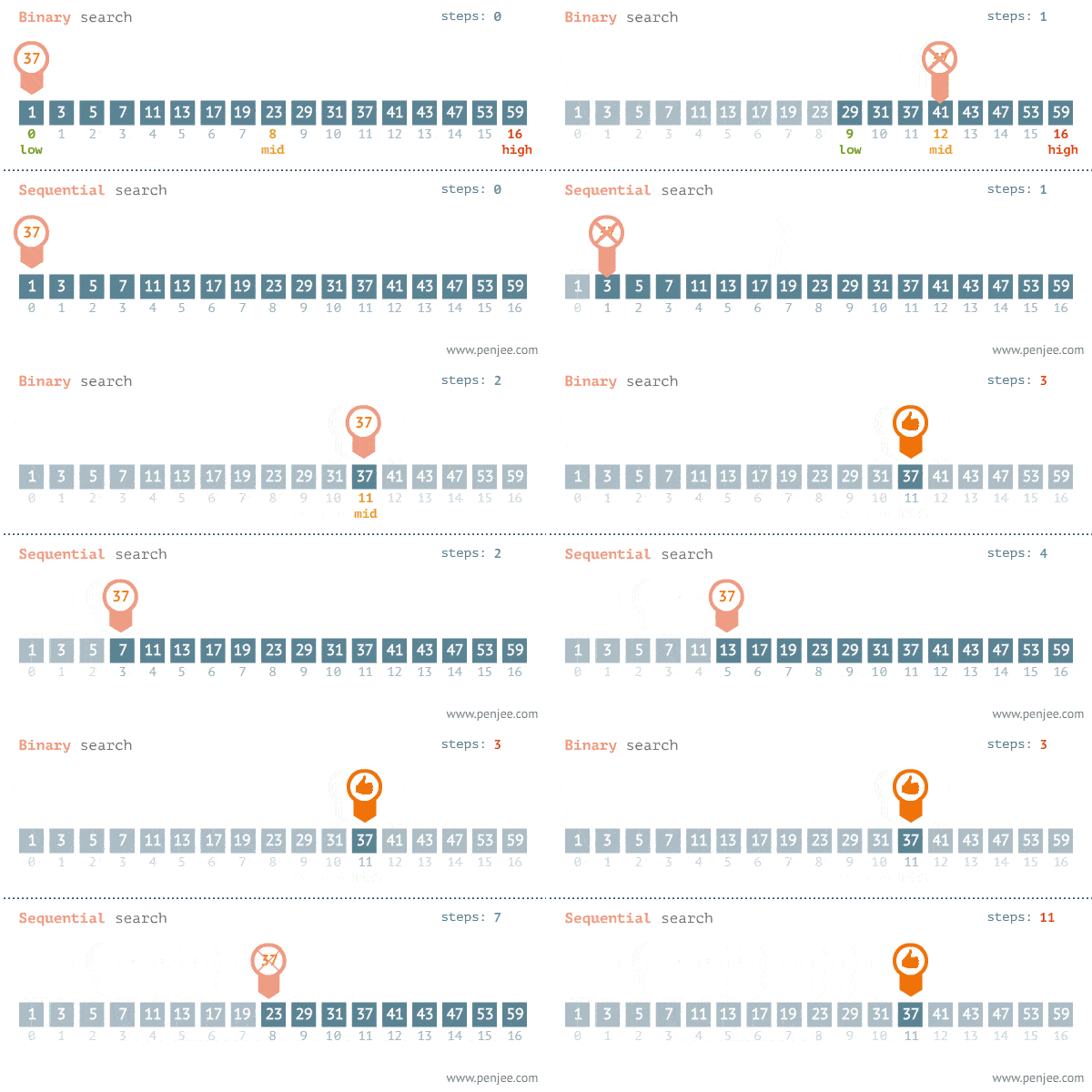
Algorithm:
i) Check if the array is not empty.
ii) Initialize the variables start and end. start should be 0 and end should be the last index of the array.
iii) Initialize the variable mid. mid should be the middlemost index of the array.
iii)Start the while loop with a condition that checks for the value being searched for and also checks if the variable start is lesser or equal to the variable end.
iv) If the value being searched for is less than the value at mid, decrease the value of end by 1 and find the middlemost index of the array again.
v) If the value being searched for is greater than the value at mid, increase the value of start by 1 and find the middlemost index of the array again.
vi) Repeat steps (iv) and (v), until the while loop condition is satisfied.
vii) Return the value of mid, if it is the index of the value being searched for. Or return -1.
The code:
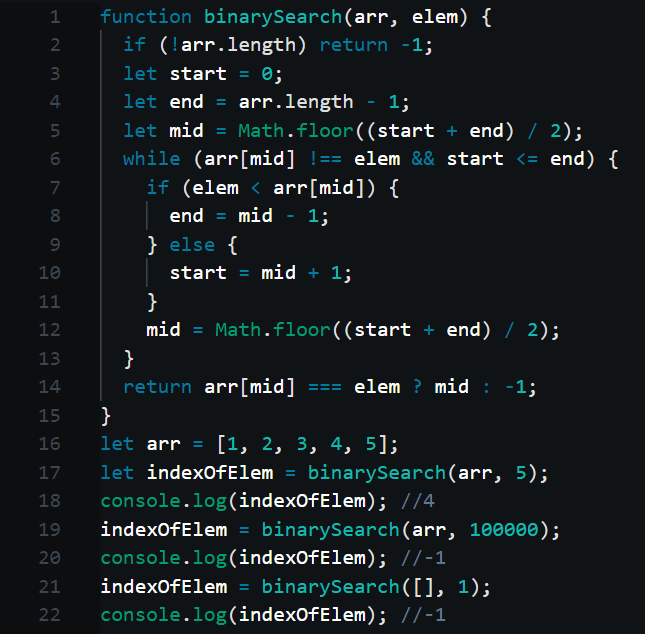
Code Explanation:
Line 2: checking if the array is empty. The code will return -1, if it is empty.
Line 3: initializing the variable start. Its initial value must be 0, the starting index of the array.
Line 4: initializing the variable end. Its initial value must be the last index of the array (i.e., array.length-1).
Line 5: initializing the variable mid. Its initial value must be the middlemost index of the array. Hence we use the variables start and end to find the middlemost index. By feeding start and end to the expression, Math.floor((start+end)/2), we can get the middlemost index. We use Math.floor() to round the result.
Line 6: initializing the while loop with a condition that checks for the value being searched for and also checks if the variable start is lesser or equal to the variable end. In other words, the while loop will exit, if the code finds the value being searched for or if the code cannot find the value and is out of elements to compare.
Line 7: if the value being searched for is less than the value at the index ,mid, decrease the value of end by 1 and find the middlemost index again (by executing line 12).
Line 10: else if the value being searched for is greater than the value at the index , mid, increase the value of start by 1 and find middlemost index again (by executing line 12).
Line 12: with the new start or end value, we find the middlemost index again i.e., we re-initialize the variable mid. This step slices the search scope into half. The code now has fewer comparisons to make and hence can find the value much faster
Line 14: the code returns the value of mid if it is indeed the index of the value being searched for. Or else the code will return -1 to denote that the value was not found.
Line 16: initializing the test array arr.
Line 17: binary-searching for the index of 5. The result will be stored inside the variable indexOfElement.
Line 18: printing the result. The result is 4 (4th index of the array ’arr’).
Line 19: binary-searching for the index of 100000. The result will be stored inside the variable indexOfElement.
Line 20: printing the result. The result is -1 as it is not inside the array arr.
Line 21: binary searching for the index of 1, inside an empty array. The result will be stored inside the variable indexOfElement.
Line 22: printing the result. The result is -1 as nothing is inside the array.
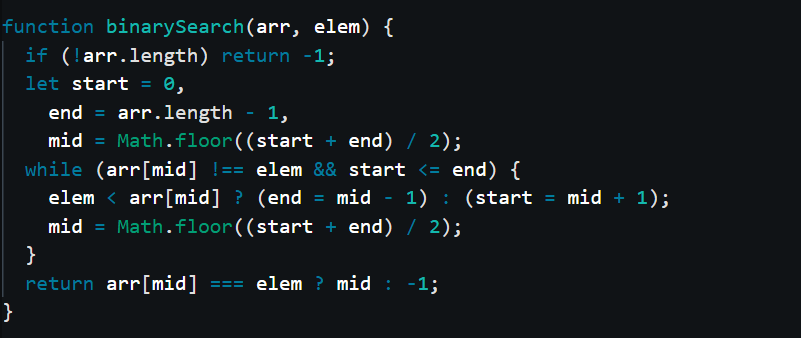
We can refactor the above code and make it even shorter.
Big ”O”:
The time complexity of the binary search algorithm is O(logn) and its space complexity is O(1). It is a very efficient algorithm. However, it can only work on a sorted array. If you want to search for an element in an unsorted array, you can use the default linear search functions of JavaScript (find()/findIndex()).
That’s about it. I hope this article was understandable. Stay tuned. I’ll be back.

