Merge Sort Algorithm using recursion.

The merge sort is a very popular sorting algorithm. JavaScript comes with its own sorting function (sort()). However the sorting algorithms used by the various browsers are different from each other. So when you use sort() to sort an array with Mozilla firefox, firefox will automatically use the merge sort algorithm. Likewise, chrome uses a different algorithm when you use sort(). With that said let’s dive into merge sort!

Algorithm:

  1. With recursion,split the array to be sorted into two equal parts.
  2. Split the two splitted-up arrays repeatedly, until the program returns an array with a single/no value.
  3. With that done, sort and merge the splitted-up arrays and return the sorted array to the previous stack. The sorting should be done by comparing one splitted-up array with another. Repeat this step until the program merges and sorts all the splitted-up arrays. Eventually after all the call-stacks are removed, the program will have the fully sorted array.
  4. Return the sorted array.
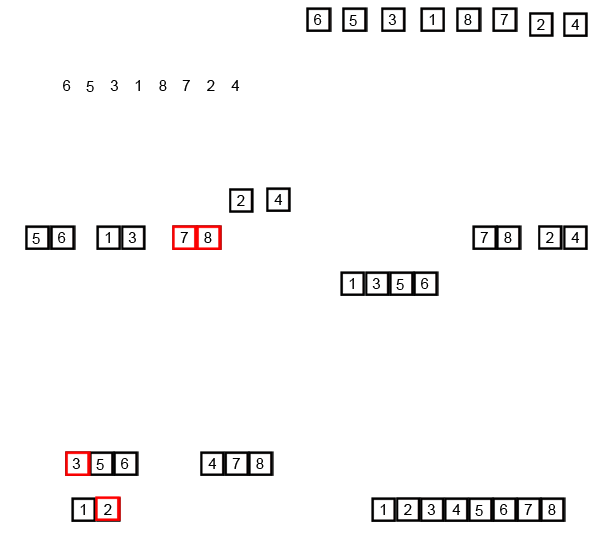
An unsorted array is being sorted by using merge sort

Code:

Code explanation:

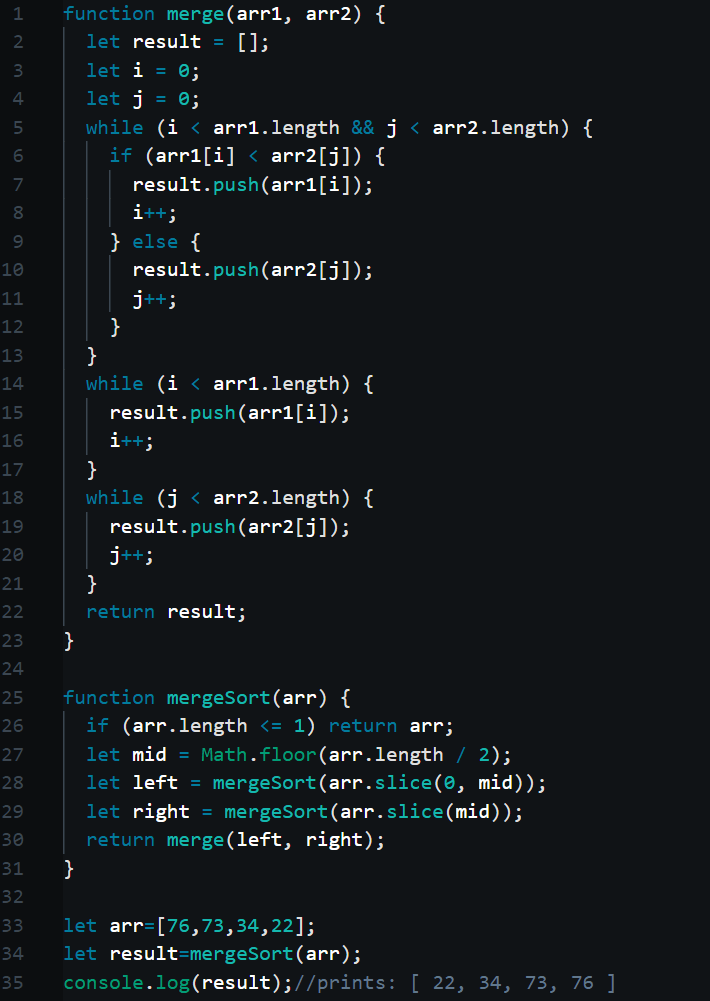
I know. The algorithm didn’t make a lot of sense. We have two functions. One function ,mergeSort(), splits the array into many parts using recursion. The other ,merge(), sorts the splitted-up arrays and merges them together. So let’s try to sort the small array ,[76,73,34,22] with our code.

Step 1:

[76,73,34,22]

  1. Line number 34: The mergeSort function is called with the array argument [76,73,34,22].
  2. Line number 26: checks the length of the array. If it is less than or equal to one, the array is returned back. This is an important step. You will see why.
  3. Line number 27: finds the array’s middle most index. The middle index of the array is 2.
  4. Line number 28: with the array’s middle most index, we slice the array (from the 0th index to the middle index.). The slice gives us [76,73] and with this new array argument we call the mergeSort() function again. This will push another mergeSort() function call into the call stack. The function call mergeSort([76,73,34,22]) waits for the second function call mergeSort([76,73]) to return a value. The code will resume execution after that.

Step 2:

[76,73]

  1. The array argument([76,73]) enters the mergeSort() function.
  2. Lines 26-27: these lines are executed again. The middle index of this array argument is 2 The code continues to line number 28.
  3. Line number 28: with the array’s new middle most index, we slice the array (from the 0th index to the middle index.). The slice gives us [76] and with this new array argument we call the mergeSort() function again. This will push another mergeSort() function call into the call stack. This function call mergeSort([76,73]) waits for the function call mergeSort([76]) to return a value. The code will resume execution after that.

Step 3:

[76]

  1. The array argument([76]) enters the mergeSort() function.
  2. Line number 26: checks the length of the array. If it is less than or equal to one, the array will be returned back. The length of the array argument([76]) is one and hence the code will return the value. This function call mergeSort([76]) is popped from the array.

Step 4:

[76,73]

  1. Line number 28: The code will continue the execution of the previous function call mergeSort([76,76]). The value [76] returned by the function call mergeSort([76]) is stored inside the variable left. For the sake of clarity the value of the array argument inside this scope is still [76,73] and the middle index of the array argument is 2. The slice() function creates a new array without changing the original array.
  2. Line number 29: with the array’s middle most index, we slice the array (from the middle index to the last index. The middle index is 2.) again. The slice gives us [73] and with this new array argument we call the mergeSort() function again. This will push another mergeSort() function call into the call stack. The function call mergeSort([76,73]) waits again for the function call mergeSort([73]) to return a value. The code will resume execution after that.

Step 5:

[73]

  1. The array argument([73]) enters the mergeSort() function.
  2. Line number 26: checks the length of the array. If it is less than or equal to one, the array will be returned back. The length of the array argument([73]) is one and hence the code will return the value. This function call mergeSort([73]) is popped from the array.

Step 6:

[76,73]

  1. Line number 29:The code will continue the execution of the previous function call mergeSort([76,73]). The value [73] returned by the function call mergeSort([73]) is stored inside the variable right.
  2. Line number 30: the code has both the values(left and right) necessary to call the merge() function. The merge() function is called with the variables left([76]) and right([73])

Step 7:

[76],[73]

  1. The array arguments, [76] and [73] enter the merge() function.
  2. Lines 2-4: three variables namely result ,i and j are declared; result is an array variable that will be used to store the eventual result(the merge-sorted array). The two arrays will be traversed. i keeps track of the indexes of the first array and j keeps track of the indexes of the second array.
  3. Lines 5-13: the while loop runs until one of the arrays or both the arrays are traversed completely. The value at a particular index(i and j represents indexes.initially i and j are zero) of the first array(in this case [76]) is compared with the value at a particular index of the second array (in this case [73]) and if the value from the first array(arr1[i]) is smaller than the value from the second(arr2[j]), the value of the first array is pushed into the result array and the i is incremented by one. Else the value from the second array is pushed into the result array ,for being obviously smaller than the array from the first array, and the variable j isincremented by one. In this scenario, the value 73 is pushed into the result array first, followed by 76.
  4. Lines 14-21: these while loops are used to push the rest of the values of the two array arguments. If one of the two array arguments(arr1[i]/arr2[j]) is traversed completely(i.e.,once the code traverses all the indexes within length) before the other array, the code will push the rest of the values of the array which still has indexes that need to traversed, into the result array.
  5. Line number 22: This process sorts (by comparing the values from the two arguments) and merges the two array arguments. The result array or the sorted array) array [73,76] is returned.

Step 8:

[34,22]

  1. Line number 28: The function call mergeSort([76,73]) will be popped from the call stack . The array value [73,76] ,from the function call mergeSort([76,73]), is returned to the function call mergeSort([76,73,34,22]) and store inside left.
  2. The recursion process is repeated and the function call mergeSort(34,22) eventually returns the sorted result [22,34]. This result array ,[22,34], is stored inside right.
  3. Line number 30: the code has both the values(left and right) necessary to call the merge() function. The merge() function is called with the variables left([73,76]) and right([22,34]) and the merge() function will return the result [22,34,73,76], the final solution.  The eventual result ,[22,34,73,76], is returned by the function call mergeSort([76,73,34,22]) and it is popped from the call stack.

Step 9:

[22, 34,73,76]

  1. Line number 34: The sorted array is stored inside result
  2. Line number 35: The result is printed.

Big “O”:

The Big “O” of the merge sort algortithm is O(nlog), which is very good for a sorting algorithm. We have two parts to consider here; ‘n’ and ‘logn’. Firstly ,according to the algorithm, the code splits the array into many halves, and stops when it can’t go any further. This splitting-up process equals to O(logn). Now we have our first part. Secondly, according to the algorithm, the code merges and sorts the splitted-up arrays. It sorts them by comparing the values of the splitted-up arrays. This process of merging and sorting equals to O(n), because the comparisons made here depends on the number of values the array has. When we multiply these two, we get O(nlogn). The space complexity of the merge sort algorithm is O(n), as you have to store the splitted-up arrays; and that depends on the length of your array.
Further reading

Recursion.

A recursive function is a function which calls itself. The program uses a particular function repeatedly to accomplish a specific task. But before we dive deep into recursive functions, it is important to understand the call-stack properly first.

Call-stack:

Consider,

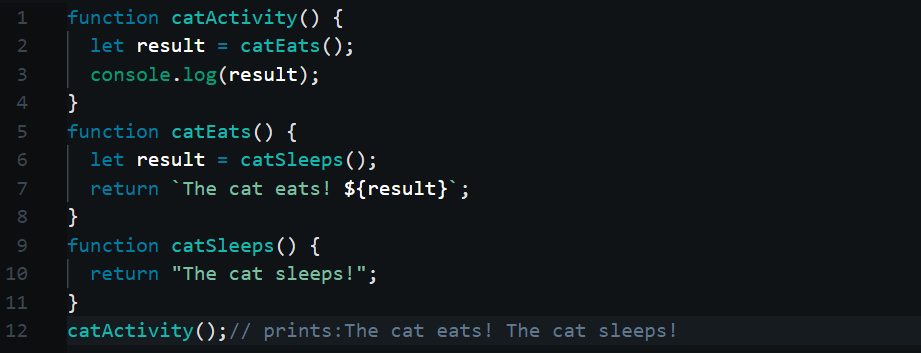
The above code is kind of like recursion. So what is going on here? The code calls the function catActivity(). catActivity() in turn calls catEats() and catEats() in turn calls catSleeps(). Then catSleeps() returns a string result. catEat() appends the result, from catSleeps(), to the another string and returns it to catActivity(). catActivity() prints the string result eventually. But something is going on in the middle. When a function is called, the function call is pushed into something called a call-stack. What is a stack?

According to Wikipedia:

“In computer science, a stack is an abstract data type that serves as a collection of elements, with two principal operations:

  • push, which adds an element to the collection, and
  • pop, which removes the most recently added element that was not yet removed.

The order in which elements come off a stack gives rise to its alternative name, LIFO (last in, first out).”

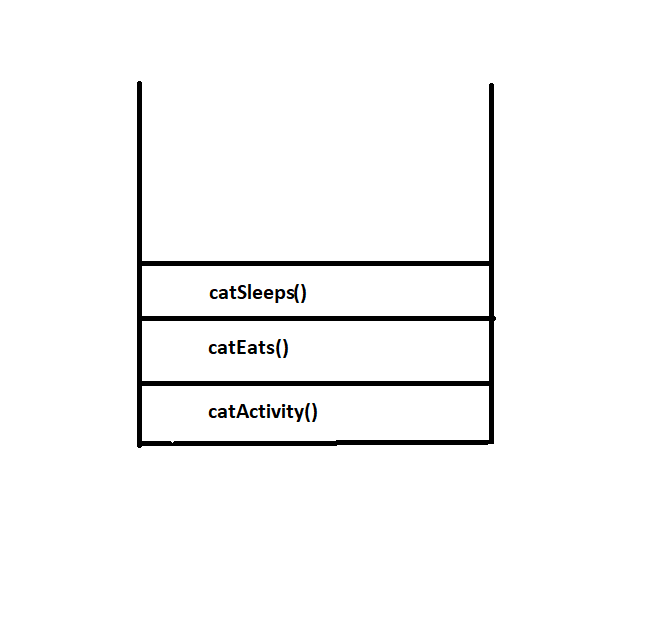
For the sake of clarity, a stack is like your laundry bucket. When you put all your dirty clothes into the bucket, the first cloth you can get out of that bucket will obviously be the last cloth you put in (unless you want to stick your hand into your dirty laundry and grab something at the bottom. Let’s not even go there). Now that’s how a stack works. The first element that goes into a stack will be the last to come out. It is a vital data-structure methodology. In this case, we are using a stack to keep track of all the method calls. JavaScript is not the only language that uses a call stack. Most languages use this methodology. So in the above code, the first function call to get into the stack, would be catActivity() and the last to get into the stack would be catSleeps(). So after catSleeps() returns a string value, it will be the first to be popped/ removed from the stack. It was the last to be added to the stack.

A function that returns void(or nothing) will be removed from the stack after the execution of its last statement and a function that returns a value will be removed from the stack after the execution of the return statement.

So after catSleeps(), catEats() will return its string result and be removed from the stack. The last method call, catActivity() will be removed from the stack after it console.logs the string result from catEats(). Hence the first the method-call that went into the stack was the last to come out of the stack. So don’t forget. Your code, will always use a stack to keep track of its function/method calls. Recursion heavily relies on this concept. We will now dive into the main topic, Recursion.

The call-stack of the above code :

Recursion:

Consider,

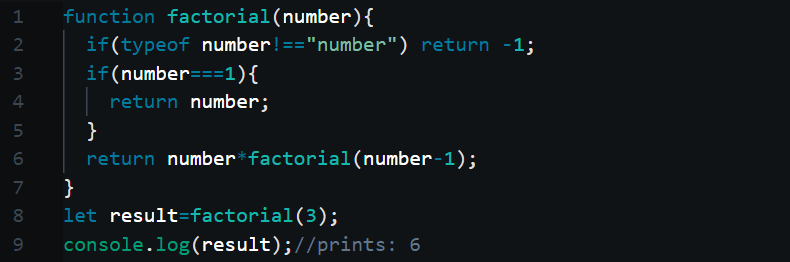
A factorial program using recursion

The above code calculates the factorial of 3. For your information, this code cannot calculate the factorial of very large numbers. I am just using it’s because its easy to understand. If you can’t understand the term ‘factorial’, please google it. The factorial of 3 is equal to 3*2*1. The result of the product is 6. Now how does our code calculate this? We will see. The code starts the execution at line 8(obviously!). The code will run in the order of the explanation steps below.

Code Explanation:

Line 8: calling the factorial function with the argument 3.

Line 1: the code enters the function with the argument 3 i.e.,inside the function scope, number is now equal to 3

Line 2: the line checks if the value of number is actually a number.

Line 3: the line checks if the argument value is equal to 1 i.e., it checks if it is the last number of the product. The check fails.

Line 6: this is where the magic happens. The function calls itself with a different argument value, 2(because number-1=2, i.e.,3-1=1). Now the call stack ,along with factorial(3), has another function call, factorial(2).The return statement of factorial(3) is now waiting for factorial(2) to return a value, in the stack.

Lines 1 to 5 are once again executed. The code enters the function with the argument 2 i.e., inside this function scope, number is equal to 2.

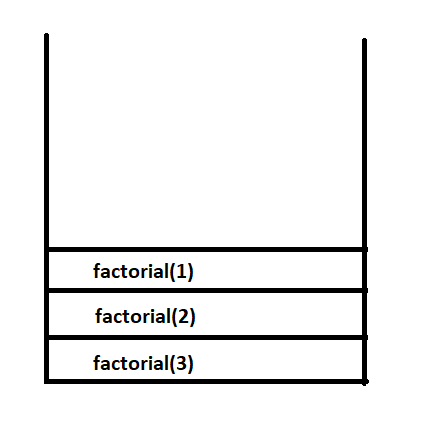
Line 6: the function calls itself with a different argument value again, 1(because number-1=1. i.e., 2-1=1). Now the call stack ,along with factorial(3) and factorial(2), has another function call,factorial(1).The return statement of factorial(2) is now waiting for factorial(1) to return a value, in the stack.

The call stack of the code above:

Line 1 to 2 are once again executed. The code enters the function with the argument 1 i.e., inside this function scope, number is equal to 1.

Line 3: as number is now equal to 1, the code enters the if statement.

Line 4: The code returns number, which, according to this scope, is 1. The function call, factorial(1) reaches completion and is removed/popped from the stack.

Line 6: The function call, factorial (2), which was waiting for factorial(1) to return a value , is now ready to return a value. factorial (2) gets 1 from factorial(1), i.e.,  the value factorial(1) returned. factorial (2) returns 2 after the multiplication of 2 and 1(2 is the value of number in this scope, and 1 is the value coming from the function call,  factorial(1) ). factorial (2) is now popped from the stack.

Line 6: The function call, factorial(3), which was waiting for factorial(2) to return a value , is now ready to return a value. factorial(3) gets 2 from factorial(2) i.e., the value factorial(2) returned. factorial(3) returns 6 after the multiplication of,3 and 2 (3 is the value of number in this scope, and 2 is the returned value coming from the function call factorial(2) ).factorial(3) is the last function call to be popped from the stack and it was the first function call to enter the call stack.

Line 8: The variable result stores the value from the function call (factorial(3)).

Line 9:  prints 6 the result.

In short, the factorial function calls itself using different arguments, until it satisfies the condition, number===1. After that point, it returns the values produced by the function calls. The returned values from each function call are multiplied with each other and the code eventually returns the factorial of 3.

So a recursive function does two things to accomplish a task; it calls itself repeatedly to satisfy a specific condition and after it satisfies that condition, it returns the result of every function call in the stack. This chain reaction eventually produces a valid result. There is also a limit to how much a stack can hold. That’s about it. I hope this was understandable. I’ll be back. Thank you for reading!

The Binary Search Algorithm.

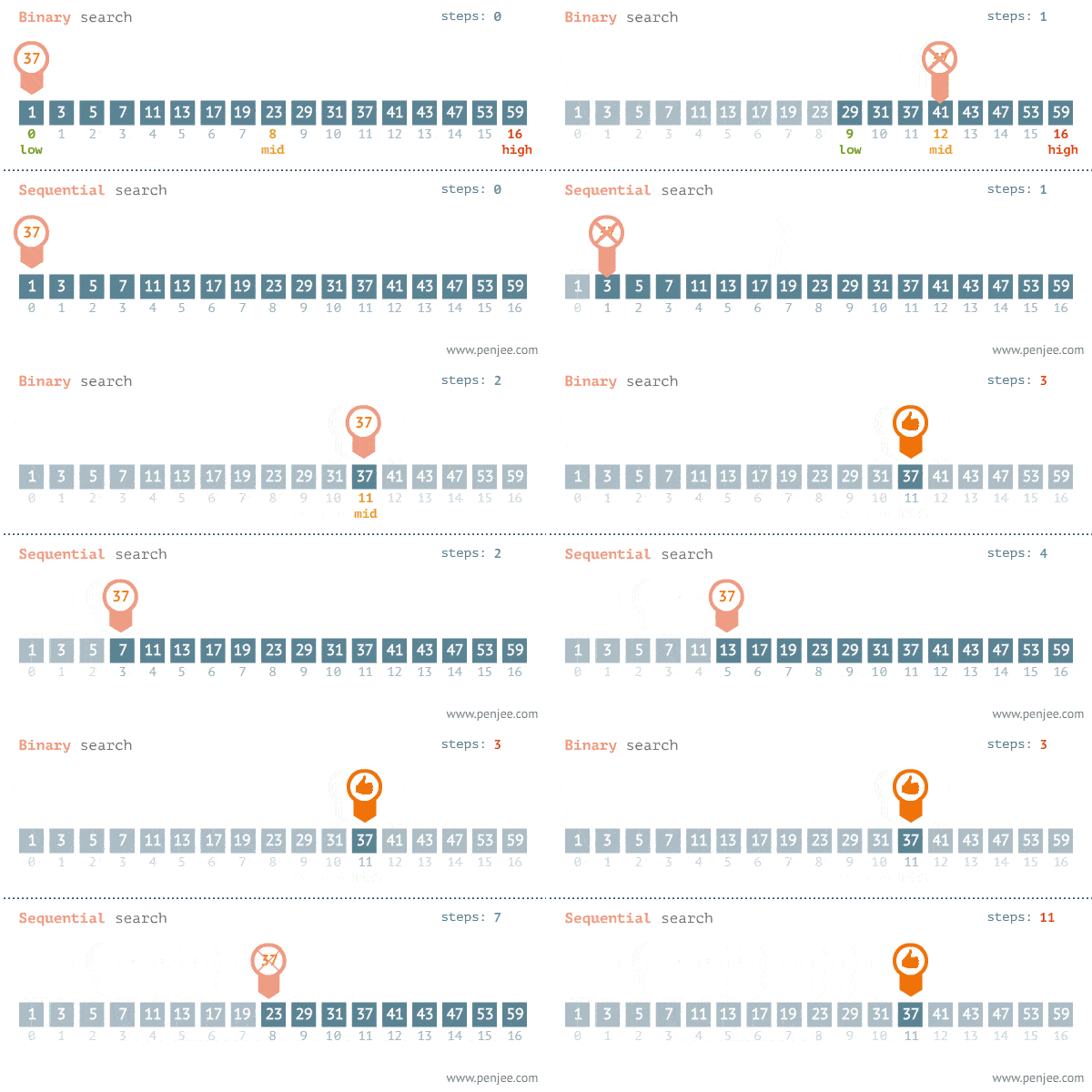
The binary search algorithm is one of the fastest ways to find an element in a sorted array. Unlike linear/sequential search, the binary search does not compare the element being searched for with all the elements of the array. Fewer comparisons equals to more speed. Every JavaScript developer should have a knowledge about this algorithm. If you are searching for an index or a value in a sorted array, you can use this algorithm instead of JavaScript’s find()/findIndex(). With that said, let’s dive right in.

Algorithm:

i) Check if the array is not empty.

ii) Initialize the variables start and endstart should be 0 and end should be the last index of the array.

iii) Initialize the variable midmid should be the middlemost index of the array.

iii)Start the while loop with a condition that checks for the value being searched for and also checks if the variable start is lesser or equal to the variable end.

iv) If the value being searched for is less than the value at mid, decrease the value of end by 1 and find the middlemost index of the array again.

v) If the value being searched for is greater than the value at mid, increase the value of start by 1 and find the middlemost index of the array again.

vi) Repeat steps (iv) and (v), until the while loop condition is satisfied.

vii) Return the value of mid, if it is the index of the value being searched for. Or return -1.

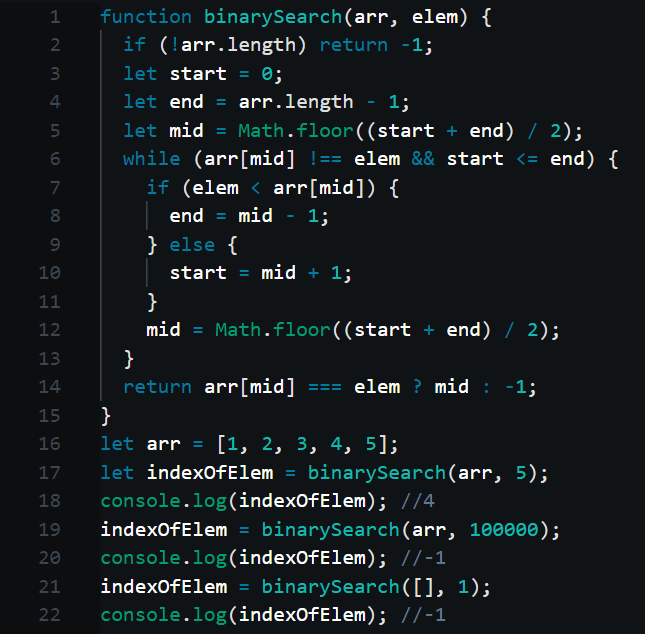
The code:

Code Explanation:

Line 2: checking if the array is empty. The code will return -1, if it is empty.

Line 3: initializing the variable start. Its initial value must be 0, the starting index of the array.

Line 4: initializing the variable end. Its initial value must be the last index of the array (i.e., array.length-1).

Line 5: initializing the variable mid. Its initial value must be the middlemost index of the array. Hence we use the variables start and end to find the middlemost index. By feeding start and end to the expression, Math.floor((start+end)/2), we can get the middlemost index. We use Math.floor() to round the result.

Line 6: initializing the while loop with a condition that checks for the value being searched for and also checks if the variable start is lesser or equal to the variable end. In other words, the while loop will exit, if the code finds the value being searched for or if the code cannot find the value and is out of elements to compare.

Line 7: if the value being searched for is less than the value at the index ,mid, decrease the value of end by 1 and find the middlemost index again (by executing line 12).

Line 10: else if the value being searched for is greater than the value at the index , mid, increase the value of start by 1 and find middlemost index again (by executing line 12).

Line 12: with the new start or end value, we find the middlemost index again i.e., we re-initialize the variable mid. This step slices the search scope into half. The code now has fewer comparisons to make and hence can find the value much faster

Line 14: the code returns the value of  mid if it is indeed the index of the value being searched for. Or else the code will return -1 to denote that the value was not found.

Line 16: initializing the test array arr.

Line 17: binary-searching for the index of 5. The result will be stored inside the variable indexOfElement.

Line 18: printing the result. The result is 4 (4th index of the array ’arr’).

Line 19: binary-searching for the index of 100000. The result will be stored inside the variable indexOfElement.

Line 20: printing the result. The result is -1 as it is not inside the array arr.

Line 21: binary searching for the index of 1, inside an empty array. The result will be stored inside the variable indexOfElement.

Line 22: printing the result. The result is -1 as nothing is inside the array.

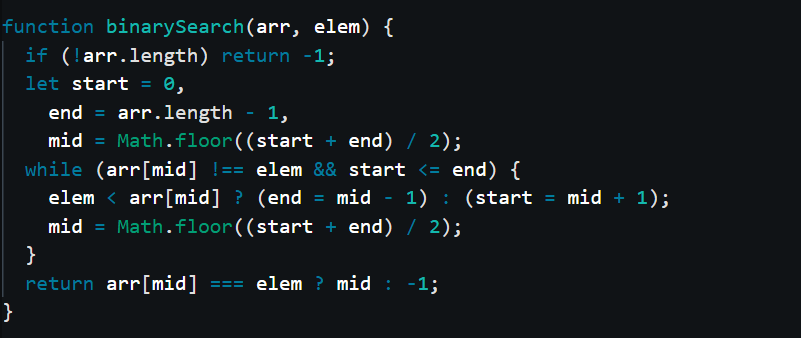
We can refactor the above code and make it even shorter.

Big ”O”:

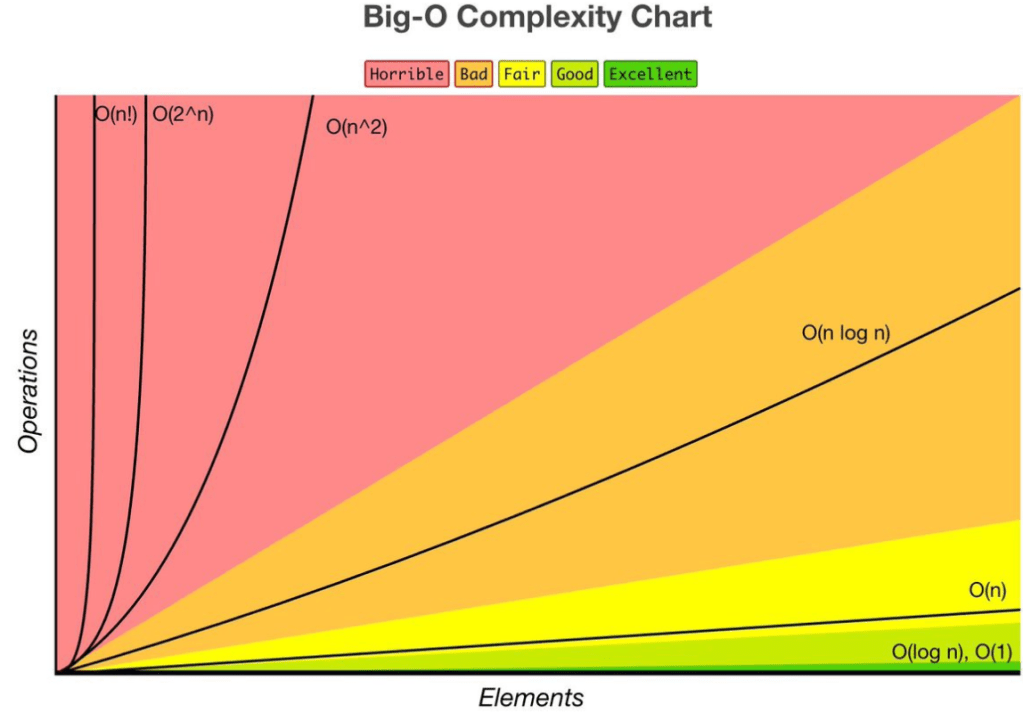
The time complexity of the binary search algorithm is O(logn) and its space complexity is O(1). It is a very efficient algorithm. However, it can only work on a sorted array. If you want to search for an element in an unsorted array, you can use the default linear search functions of JavaScript (find()/findIndex()).

That’s about it. I hope this article was understandable. Stay tuned. I’ll be back.

An introduction to computer algorithms and Big ‘O’

Why use Algorithms? That’s actually a good question. I know many developers who code without having any knowledge about algorithms or data structures. Some of these developers even end up at the top of the company hierarchy. Then why bother? Well if you simply want to be another developer, don’t bother to learn algorithms or data structures. However, if you want to stand out as a software developer, read on. Linus Torvalds once said, “Bad programmers worry about the code. Good programmers worry about data structures and their relationships.” In this article, we‘ll discuss the fundamentals of computer algorithms. We will also look into a very important topic called Big “O” notations. Hopefully, I want you to successfully take your first baby step into the world of algorithms! I expect you to have a basic understanding of JavaScript to understand this article.

What are algorithms?

According to Wikipedia:

“In mathematics and computer science, an algorithm (/ˈælɡərɪðəm/ ) is a finite sequence of well-defined, computer-implementable instructions, typically to solve a class of problems or to perform a computation.”

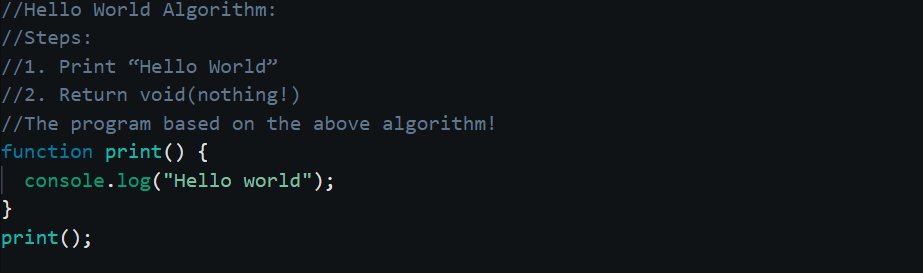
In other words, an algorithm is a blue print, with a set of instructions that a program should follow to accomplish a specific task. For instance, the algorithm to print “Hello World” can be used to print “Hello world” programmatically.

Nothing complicated here. The complexity lies in contriving an optimal algorithm, which is either time-efficient or space efficient. To be even clearer, the algorithm we create should make the program reach completion without wasting a lot of time or space (memory). Some algorithms are meant to consume more space, but they may be more time efficient(like the merge sort algorithm) and some , may consume no space at all, but may not be very time efficient(like the bubble sort algorithm). Every algorithm will have its advantages and disadvantages. How you use your algorithm is largely dependent on the scenario.

Time/Space complexity:

Time/Space complexity is used to determine the time or space taken by a specific algorithm. We can determine the optimality of an algorithm depending on these two factors. But how would you measure this? Well we can use a timer to calculate the time taken for a program, based on an algorithm, to complete. However this may not produce accurate results all the time. Why? Because of other influencing factors such as computer speed, OS background tasks etc, your results may not be always accurate. What can be done then? Enter Big O. By using Big O notations we can understand the efficiency of an algorithm with ease. Let’s dive right in.

Big ‘O’ notation:

According to Wikipedia, the definition of Big ‘O’ is:

“In computer science, big O notation is used to classify algorithms according to how their running time or space requirements grow as the input size grows.”

With Big O, we try to determine the efficiency of an algorithm by regarding two factors; the size/length of the input, and time/space taken by the algorithm to process the input and produce an output.

Standard Big ‘O’ notations:

We will go through some of the standard Big ‘O’ notations.

O(n):

The above code executes ‘n’ number of times(because of the for loop of course). For instance, if the length of ‘n’ is 10, the code will get executed 10 times. The time taken for the above code to complete is linear. So the Big O of the above code is O(n). O(n) literally means that the time/space taken by an algorithm is directly proportional to the length of the input(n). O(n) is one of the standard Big O notations.  JavaScript array functions like find, filter etc have a Big O of O(n). For instance the array’s filter function will have to check all the items of the array. So the bigger the array gets, the more time the filter function will require to complete.

O(n2):

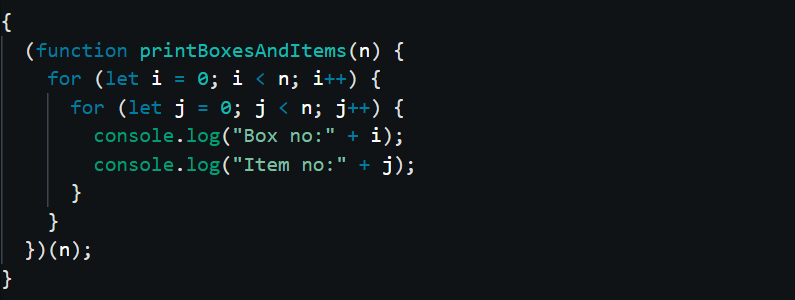
Suppose there are ‘n’ numbers of boxes and each box contains ‘n’ numbers of items. How will you go through all the items? You will of course have to use a nested for loop. We will have to traverse all the boxes (n) and the items (n) inside each box. So the input of such an implementation will be ‘n’ and its output will be n(for the sake of clarity, n(boxes)*n(items)=n2).

So the above program is not time efficient, because the time taken to complete the task is double that of the size/length. In other words, the time taken to reach completion is quadratic. Use of nested for loops must be avoided, if at all possible.

O(logn):

This is an interesting Big O notation. However in order to explain this clearly, I will have to briefly discuss the Binary search algorithm.  First of all a binary search algorithm can only work on a sorted array. The binary search algorithm:

Steps:

1)The binary search initially looks for the middle most index of the array and compares it with the value being searched for.

2)If the value being searched for matches the value of the middle index, the code will stop its search. If not, the code will check if the value being searched for is less than the value of the middle index.

3)If it’s lesser, the code will once again find the middle index, by regarding the index before the current middle index as the last index of the array.

4)If it’s higher, the code will find the middle index, by regarding the index after the current middle index as the first index of the array. These steps will be repeated, until the code finds the value. 

This may not be very clear to you now. I will later include an exclusive article about binary search. In short, the binary search chops down the length of the array into half, after every iteration. So let’s just assume that the binary search locates the value being searched, during the last iteration and let’s also assume the size of the array to be 32. We can now equate that to,

25=32 -where 5 denotes the number of steps required to find the value, and 2 represents the chop that happens after every iteration

So generally speaking that is equal to

2x=n

By applying the rules of binary logarithm this is equal to,

log2n=x

i.e.,logn=x  -this literally means that the algorithm will require a maximum of x steps to complete

What all this literally means is that the time taken to complete is logarithmic. Hence the Big O notation for this algorithm is O(logn). This is actually very good and way better than O (n). So in order to find an element in the array below,

let a=[1,2,3,4]

it will just take the binary search two steps tops. How? Just apply the formula above. The length of the array, ‘a’, is 4 and when you apply that to the formula we get two.

log24=2

It’s as simple as that. You will understand this even better, when you fully understand the binary search algorithm. So here the algorithm is not finding the required value by comparing the value with all the values of the array. Instead it simply reduces the search scope, until it finds the value.

O(1):

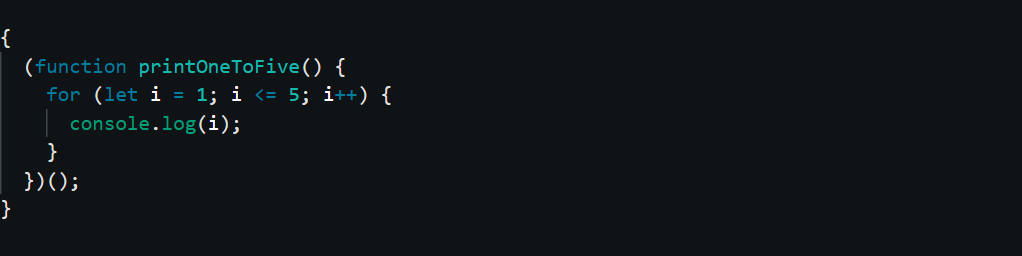
This notation literally means constant time. The algorithm, based on this notation, will always take the same amount of time to complete. Consider,

The above code will print all the numbers from 1 to 5. No matter how many times you execute this code, it will take the same amount of time to complete. So the time taken to reach completion is constant. There is also another scenario we should consider. Let’s just say that we are trying to locate an element of an array ,with the array’s filter function, and that value is sitting at the first index of the array(it is not literally sitting on an index!). The algorithm will then just take a time of O(1) to complete. Why? Because the function was able locate it almost immediately without having to traverse the entire array. This is why the time taken to push a value into an array is always O(1). The array simply creates a new index at the end and pushes the new value into that index. However, the time taken to shift/unshift a value is O(n). Why? Every time you shift/unshift a value, the array will have to change the indices of all the values inside it and the time taken to do this depends on the length of the array. Hence the time taken to shift/unshift is O(n). O(1) is the best output you can get out of an algorithm. It is even better than O(logn).

O(nlogn):

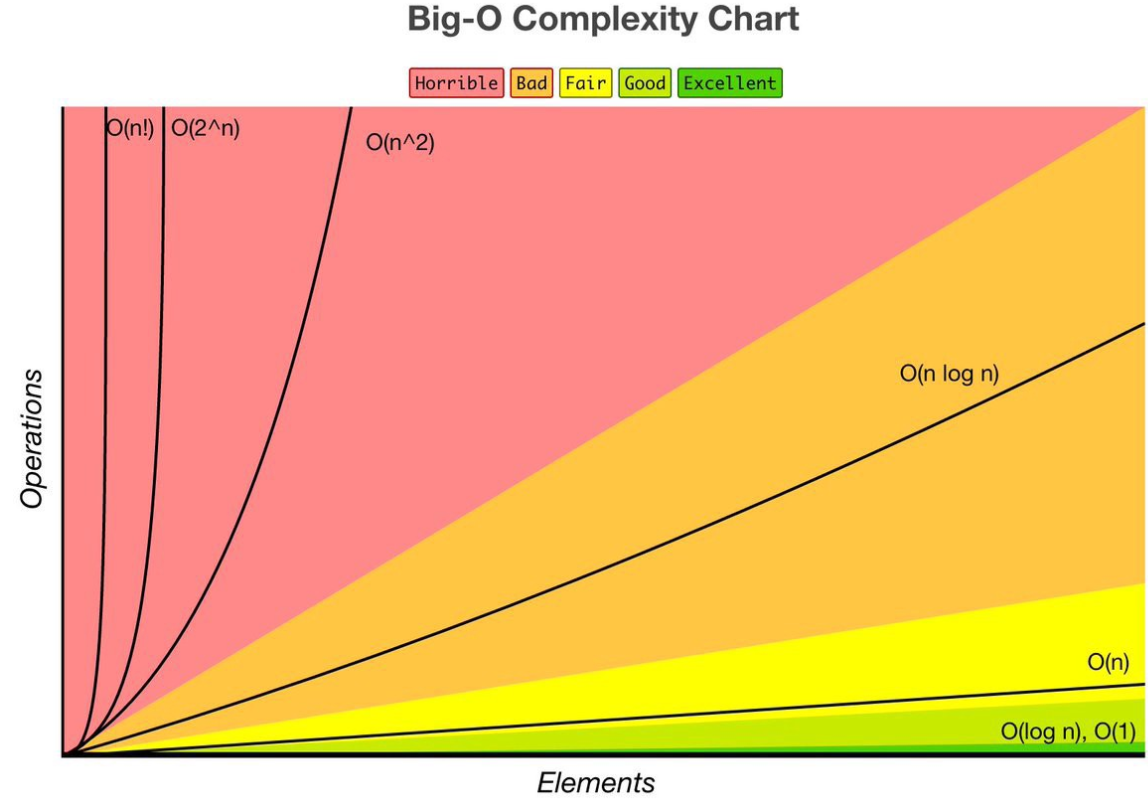
This notation is actually better that O(n2),but worse than O(n). It doesn’t sound all great, right? But it is one of the best outputs you can get from a sorting algorithm. Sorting, regardless of what you do, takes time. When your program is sorting an array, it swaps the elements of the array, until they are completely sorted. That’s going to cost a lot of time no matter what.  With that said, I will have to briefly discuss  the merge sort algorithm to understand this notation. The time complexity of the merge sort algorithm is O(nlogn). However its space complexity is O(n). I’ll explain why. So the merge sort algorithm goes like this.

Steps:

1)Split the array into two halves(now you have two arrays namely left and right).

2)Split the two arrays(left and right) again and again, until there is an array with single value or no value.

3) Merge and sort the splitted-up left and right arrays. We accomplish this by comparing the values of all the splitted-up arrays.

4) Return the sorted array.

Confusing? I totally agree. However we are not trying to understand the merge sort algorithm. We are just trying to understand the notation, O(nlogn). With that said, we have two parts to consider here; ‘n’ and ‘logn’. Firstly ,according to the algorithm, the code splits the array into many halves, and stops when it can’t go any further. This splitting-up process equals to O(logn). Now we have our first part. Secondly, according to the algorithm, the code merges and sorts the splitted-up arrays. It sorts them by comparing the values of the splitted-up arrays. This process of merging and sorting equals to O(n), because the comparisons made here depends on the number of values the array has. When we multiply these two, we get O(nlogn). I know that this makes very little sense to you now. If you can properly understand the merge sort algorithm, you will get a hang of this. The space complexity of the merge sort algorithm is O(n), as you have to store the splitted-up arrays; and that depends on the length of your array.
We‘ll see more things about Big O in my forthcoming articles. There are minor methods you can use to accurately determine the Big O of your code. I hope you found this article useful and welcome to the world of algorithms! Stay tuned! I’ll be back.

Further reading